Use Sponsored Brands video creatives to increase visibility and drive brand awareness in desktop and mobile shopping results on Amazon. Target shoppers through keywords, categories, and products, and allow them to easily access your Brand Stores or Product Detail Pages through cost-per-click ads. Sponsored Brands video ads can also be displayed within detail pages, providing even more opportunities for customers to discover your brand.
Privacy Statement
Do not enter any sensitive or personal data into the search field (e.g., name, address, financial information).
Sponsored Brands video creative
Product overview
Two ways to connect with shoppers on Amazon
1. Product Detail Page campaign
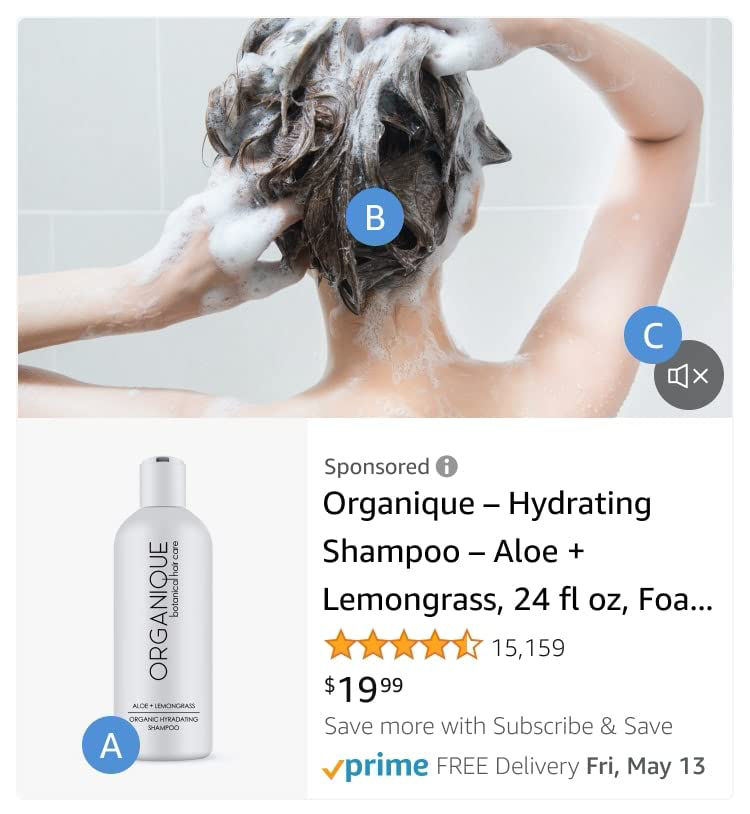
Product Detail Page: This type of campaign is best for connecting shoppers with your product. A Product Detail Page campaign will be shown in shopping results and on detail pages.
2. Brand Stores campaign
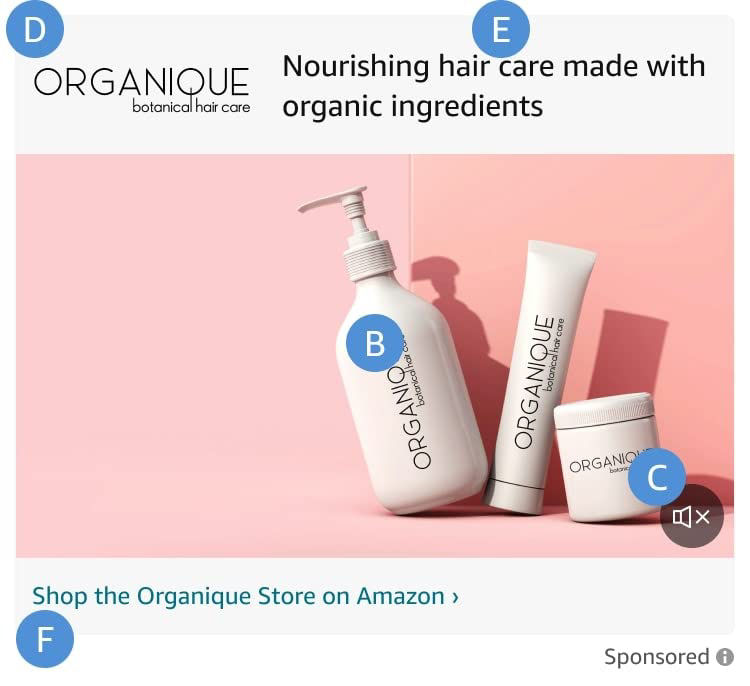
Brand Stores: This type of campaign is an effective way to increase brand equity and build lasting value by directly connecting shoppers to your Brand Store through shopping results. These campaigns can be featured both above and below the fold of search results
Anatomy of the ad unit
A. Product details
The primary product image and associated product information from the detail page are automatically displayed.
B. Video
The video will play automatically when 50% of pixels are on-screen.
C. Mute toggle button
The mute toggle button is overlaid in the lower right-hand corner of the video and controls audio playback. By default, videos always start without audio. Customers can enable audio by tapping on this button. If it is a silent video or there is no audio the mute toggle will not be displayed.
D. Custom brand logo
A clear easy to read custom brand logo makes a lasting impression
E. Headline text
Add custom text to communicate your brands value
F. Call to action (CTA)
This lets shoppers know an action is required to see your brand store on Amazon
Creative guidelines and best practices for Sponsored Brands video
- Make a great first impression. — Showcase your product or something interesting within the first few seconds to catch the shopper’s attention. Get creative and highlight what makes your brand and product stand out, and how it addresses the needs, or improves the lives of customers. Wait until later in the video to include your brand name and logo.
- Keep your video brief, easy to understand, and straight to the point. — Remember that the goal of the video is not to provide all the details about the product, but rather to create a sense of excitement and curiosity that will drive viewers to your product or Stores page for more information.
- Invest in video. — Use stunning, clear, and easy to understand visuals to capture your audience's attention and inspire them to learn more about your product and brand. A polished, high-quality, professionally-produced video is an effective way to convey the quality of your product and instill trust in your brand.
- Build brand identity. — To make your video stand out, ensure it aligns with your brand identity by using consistent visuals, colors, designs, and style throughout the video, and include an "end card" prominently displaying your brand name and logo.
Video and audio specifications
| Video duration | Between 6 and 45 seconds (20 secs or less highly recommended) |
|---|---|
| Video dimensions | 1280x720, 1920x1080, or 3840x2160px |
| File size | 500MB or less |
| File format | .MP4 or .MOV |
| Aspect ratio | 16:9 (square pixel) only |
| Video codec | H.264 or H.265 |
| Video profile | Main or Baseline |
| Frame rate | 23.976, 23.98, 24, 25, 29.97, 29.98, or 30fps |
| Video bit rate | Minimum 1 Mbps (4 Mbps or higher recommended) |
| Video scan type | Progressive |
| Audio codec | PCM, AAC, or MP3 |
| Audio format | Stereo or mono |
| Audio bit rate | Minimum 96 kbps |
| Audio sample rate | Minimum 44.1khz |
Acceptance criteria and ad policies
When creating your Sponsored Brands video campaign, keep in mind that it must meet Amazon's creative acceptance policies for sponsored ads. All content must be suitable for a general audience and must comply with all relevant laws and regulations. Ads that do not meet these policies will not be accepted.
- Save time: it is recommended to review Amazon Ads Policies page before launching your campaign. This can help you ensure that your ad is ready for Sponsored Brands video.
- Featured language: Make sure your videos match the language of the marketplace they are being shown in. For example, videos for English speaking locales should have English on-screen text or English voiceover, and videos for the Italian marketplace should be in Italian with Italian on-screen text or Italian voiceover. If you sell in more than one marketplace, consider adding subtitles or creating different versions of the video tailored to each marketplace where your products are available.
- Letterboxing or pillarboxing: avoid using videos with horizontal or vertical black, color, or blurred bars
- Video safe area: avoid placing text and other important information in the lower right corner of the video. See our safe area template
How to get started
Sign into your account and choose “Video” to build your Sponsored Brands campaign.
- More ways to get started with video
- Create your own ad creatives with Video Generator The tool is available to advertisers through the Sponsored Brands campaign creation workflow and within the "Creative tools" tab.
- Get help from trusted service providers: We know that creating a video might feel complex and time-consuming, which is why we built Amazon creative services. A single destination that makes it easy to connect with trusted service providers right within Amazon Ads Agent.
Brand Stores campaign
Choose this ad type to drive shoppers directly to your Brand Store page from Search.
Product detail page campaign
Choose this ad type to connect shoppers with a product on your product detail page.
Locales
North America
- CA
- MX
- US
South America
- BR
Europe
- BE
- DE
- ES
- FR
- IT
- NL
- PL
- SE
- TR
- UK
Middle East
- EG
- KSA
- UAE
Asia Pacific
- AU
- IN
- JP
- SG
Supported OS
iOS and Android