There are high standards for the content and functionality of Fire TV Landing Pages. This page describes the creative guidelines and available components for building them.
Privacy Statement
Do not enter any sensitive or personal data into the search field (e.g., name, address, financial information).
Fire TV Landing Page Guidelines and Components
Creative Guidelines
Simplicity
Impactful campaigns use minimal text, striking imagery, and showcase only the most important content. Clear visual structure allows customers to quickly evaluate the offer and decide whether to engage.
Made for TV
In contrast to other web and mobile platforms, TV-based interfaces use larger text, stronger navigational hierarchy, and additional visual affordances to avoid confusion and create a more simple experience. Content is kept away from the edges of the screen, where it may be cropped on some displays, and arranged in a grid to allow easy access via the remote’s directional control pad.
Provide Customer Value
Amazon’s product detail pages are a trusted and effective source of shopping information for our customers. Fire TV Campaign Landing Pages for product-focused campaigns should offer a clear customer benefit or serve an educational purpose above and beyond the information listed on your product’s existing detail page. The same principle applies to other Fire TV Campaign Landing Pages for offers and services not provided by Amazon.
Components
Tile Groups
Customers may browse an array of content or products by navigating rightward through a row of selectable tiles.
Maintaining clearly defined edges on each tile helps the user to identify what content to focus on, understand what areas are selectable, and navigate through the experience.
- Each tile must be 512px tall
- Each tile must have the same width, which will affect how many are initially visible onscreen
- Each tile must link to a destination
- Tiles may be shown with optional tile accessory text, upon selection
- Header: Each Tile Group should use a header image (1920 x 344px, transparent PNG, no maximum file size) to title the content. The image will animate upward from behind the group of tiles to align with the top of the screen when the page loads, encouraging interaction. Include a limited amount of call-to-action text, logos, or subtle imagery on top a transparent background.
Grid of tiles
Grids may contain 2 to 4 tiles. Tiles remain in the same locations when the customer scrolls right, keeping all content on-screen.

Use the following tile sizes to show the listed number of tiles onscreen:
- Format: PNG
- Maximum file size: no limit, assets will be re-encoded to WebP
| Tiles | Dimensions |
|---|---|
| 2 | 920 x 512px |
| 3 | 627 x 512px |
| 4 | 475 x 512px |
Carousel of tiles
Carousels may contain between 2 and 10 tiles. When the customer scrolls right, the selected tile aligns to the left margin of the page, allowing the customer to see additional content that may have previously been offscreen.
Up to 10 tiles may be included, in total. Based on the tile width, some may be shown offscreen until the customer scrolls to access them.

Use the following tile sizes to choose how many items are shown onscreen without scrolling:
- Format: PNG
- Maximum file size: no limit, assets will be re-encoded to WebP
| # of tiles fully visible on-screen | Dimensions |
|---|---|
| 2 | 920 x 512px |
| 3 | 627 x 512px |
| 4 | 475 x 512px |
| 5 | 380 x 512 px |
| 6 | 319 x 512px |
Buttons
Text is aligned left, inside the button area, to match the Fire TV system UI.
- Each button must link to a destination
- Button label text is limited to 26 characters
- Buttons may be aligned to the left or right side of the screen
Examples: Single view with buttons aligned left & right, Video landing page

The following attributes are modifiable:
- Selected state background color (any)
- Selected state text color (black/white)
- Unselected state (light/dark)
- Button row alignment (left/right)
Text
Several components offer the ability to render static text.
Tile Accessory

Text Block
When using the Video Landing Page template, several pre-defined styles of text may be stacked to build a text block.
The following styles are available:
| Style | Specifications |
|---|---|
| Headline | 48px Ember Regular, #EBEBEB (TV-safe white) |
| Subhead | 36px Ember Light, #EBEBEB (TV-safe white) |
| Body | 36px Ember Light, #AAAAAA (medium gray) |
- Text of each style may flow to additional lines.
- Avoid including more than 300 characters.

Background content
A background image is displayed behind the content of the page. This image will stay fixed, taking up the full screen area.
- A single image must be provided
- Text, such as legal disclaimers, may be embedded sparingly within the image.
- Backgrounds must coexist well with the light or dark exit hint that is overlaid on the bottom right corner.
| Image | High quality submission |
|---|---|
| Dimensions | 1920 x 1080px |
| Format | PNG |
| File size | no limit |
Exit Hint
A hint will be included in the bottom, right corner of the screen, ensuring that customers have a clear route to exit the ad.
- The exit hint has two variants, light or dark, which are available in the template PSD.
- Backgrounds must be distinct when shown behind the hint.

Destinations
Up to two destination types may be used in a group of buttons or tiles. Tiles should be grouped so that when destination types vary, all tiles of each type are shown together (e.g. Apps then Video Playback, varied destination types are not interspersed) with similar visual treatments.
A customer must be able to easily identify tiles that lead to video playback, or repeat playback of a video, based on the visual treatment.
When a customer highlights and selects a content tile or button, several destinations are possible:
Amazon Video detail page
- Customers can view the detail page for a title, then choose to watch or purchase. Direct playback of Amazon Video content is not currently supported.
Amazon Appstore detail page
- Customers can see the detail page for an app, then choose to purchase and install. Direct installation of apps is not currently supported.
Amazon product detail page
- Customers can purchase the product (via 1-Click or Checkout) or preorder, select twister options, add product to List, read product features, see more product images, and read customer reviews.
Content deep link
- Selecting the tile or button will open the app and load the promoted content automatically, if the customer already has the app installed. If the app is not installed, customers will be taken to the appstore detail page, then choose to purchase and install. After installing and opening the app, customers will be automatically directed to the content. Using deep links in your campaigns requires an onboarding process. Please refer to the Amazon Appstore site and contact your account representative to get started.
Video playback
- Customers may view a short full-screen video and can use standard media playback buttons to navigate within it.
| Video | High quality submission |
|---|---|
| Codec | MPEG, Apple ProRes, H.264 |
| Resolution | 1280x720px (720p) or higher, 1920x1080px (1080p) preferred |
| Bitrate | 15mbps or higher |
| File format | .mov, .mp4 |
| Frame rate | 30fps or lower |
| Maximum duration | 10min |
| Maximum file size | 500Mb |
It is preferable to not show letterboxing in videos (black bars above and below). However, if the content being promoted uses letterboxing in the full-length video, then the trailer may feature letterboxing as well.
| Audio | High quality submission |
|---|---|
| Codec | AAC |
| Sample rate | 48,000HZ |
| Bitrate | 192kbps or higher |
Fullscreen image
- A full-screen image is shown after navigation is triggered by a tile or button
- Image content must respect the red “safe area guide”, found in the landing page template PSD
- Body text must not be smaller than 26px.
- The image content may not be “shouty.” All-caps copy and exclamation points should be avoided.
| Image | High quality submission |
|---|---|
| Dimensions | 1920 x 1080px |
| Format | PNG |
| File size | no limit |
Repeat interstitial video
- This option is only available when an interstitial video is configured as a part of the page.
Send Me More
- This option is only available on a Video Landing Page.
- After watching a video, customers can request additional information to be sent via email or SMS text based on contact information associated with their Fire TV Amazon login.
Additional Features
Interstitial Video
When added, a video is shown and concludes before the customer is taken to the landing page. Customers must be able to access the interstitial video again, directly from the landing page.
- If an interstitial video is included, a button or tile — with the destination configured to “Repeat interstitial video” — must be included as well.
| Video | High quality submission |
|---|---|
| Codec | MPEG, Apple ProRes, H.264 |
| Resolution | 1280x720px (720p) or higher, 1920x1080px (1080p) preferred |
| Bitrate | 15mbps or higher |
| File format | .mov, .mp4 |
| Frame rate | 30fps or lower |
| Maximum duration | 10min |
| Maximum file size | 500Mb |
| Audio | High quality submission |
|---|---|
| Codec | AAC |
| Sample rate | 48,000HZ |
| Bitrate | 192kbps or higher |
Send Me More
The Send Me More CTA button, available on a Video Landing Page, enables a consumer to request additional information after watching a video. Additional information will be sent via email or SMS text based on contact information associated with their Fire TV Amazon login.
- The email is templated and will include a hero image, body text, and a button. If text is included within the image, it must be under 12 words and minimum of 24pt font size.
- SMS will be autogenerated based on the URL entered in the email. No design work or asset is required.
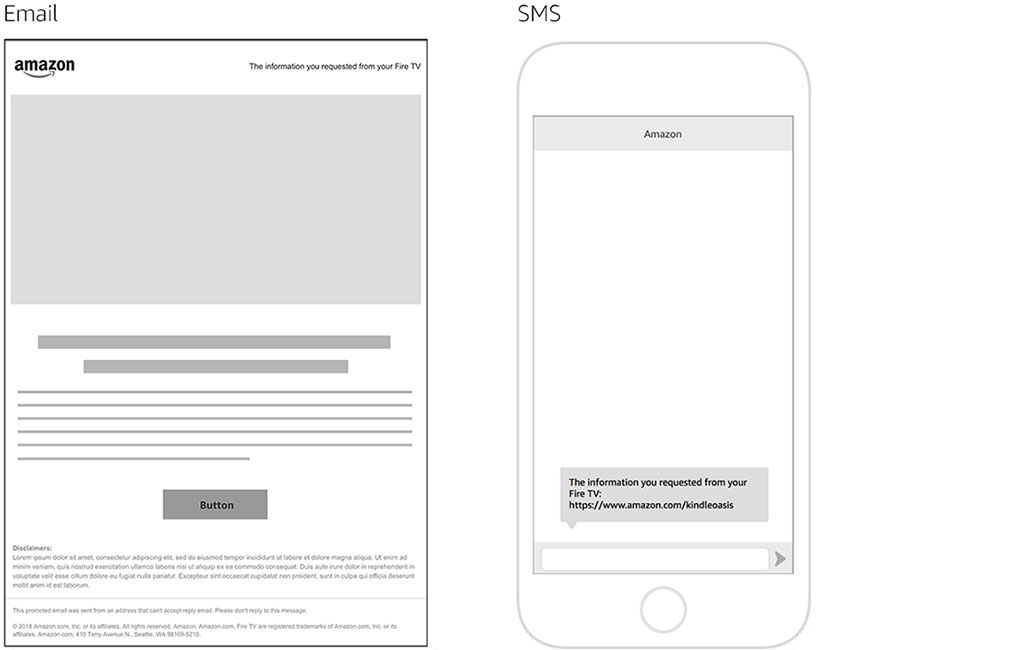
| Hero image | |
|---|---|
| Dimension | 640 x 320px |
| Format | JPG |
| File size | 60kb |
| Minimum font size | 24pt |
| Maximum word count | 12 words |
| Alt text | 1~2 sentences. Used by screen readers for visually impaired readers, and visible to the user when an image cannot be displayed in the email. |
| Body copy | |
|---|---|
| Character count | Under 450 characters, not including line breaks |
| Button | |
|---|---|
| Text character count | Up to 25 characters |
| URL | Up to 70 characters. Up to 70 characters. If exceeds the limit, advertisers should provide short URLs that redirect. |
| Advertiser’s disclaimer | |
|---|---|
| Character count | Optional field. No limit. |
Asset Checklist
- High-res layered .PSD files (product shots and/or lifestyle imagery)
- Logos (vector format, .ai or .eps)
- Any backgrounds or key art
- Fonts (.otf or .ttf)
- Advertising copy
- Brand guidelines
- Video files (see specs)
Campaign Landing Pages
Fire TV Landing pages are tailored to make the most of TV screens and navigation.
For more information on landing pages that are accessible from Amazon’s website, mobile apps, and tablet devices, please see Campaign Landing Pages.