product
Sponsored Products - Help increase product sales
Guide
Stand out from the crowd by showcasing your product highlights with contextually relevant, interactive product feature videos. With seamless integration into Sponsored Products campaigns, Sponsored Products video can help you boost engagement and drive confident purchase decisions.
Category best practices and a checklist for Sponsored Products video
Learn to create cost-effective, high-performing product videos
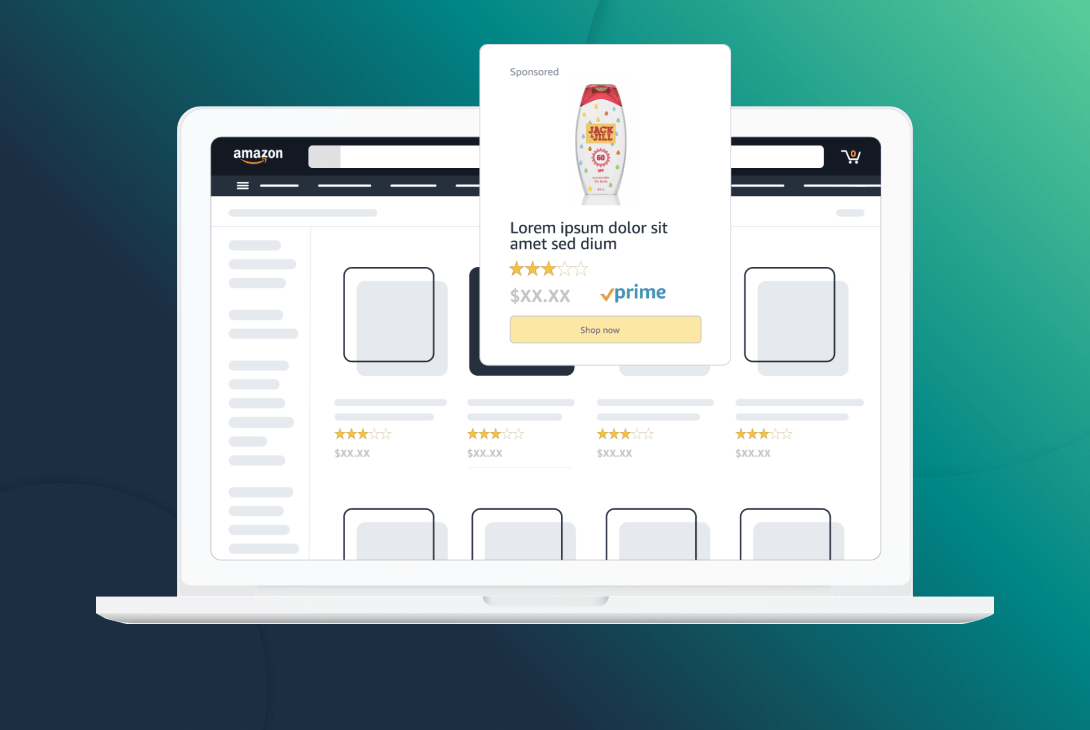
Sponsored Products video is a new ad format for Sponsored Products that enables advertisers to highlight multiple product features for a single ASIN through interactive, long-form video content (minimum seven seconds). This format integrates with existing Sponsored Products campaigns using the same campaign targeting controls and budget. Advertisers can upload one–five product feature videos per product within an ad group, each with descriptive text explaining its features. Shoppers will see up to three video thumbnails of the most contextually relevant product features based on their search query and browsing history. This allows shoppers to navigate to specific features of interest before clicking to the product detail page. Shoppers can click through either the main video or product image, offering a more flexible and relevant shopping experience.
Highlight your product features in action
Shoppers today scroll, swipe and search faster than ever. Stand out from the crowd by showcasing what’s unique about your product in a format that is not only engaging, but also clearly measurable. Of the shoppers browsing or shopping on Amazon:
Understanding product benefits and features through image or text is not always easy, and creative storytelling often requires heavy brand resources and investment. Sponsored Products video allows creative flexibility with long-form videos, providing you options to repurpose existing detail page product video assets or create new product videos—whatever works best to highlight your product.
Sponsored Products video is intended to make your products the main highlight of your video content by showing your product features in action. This helps shoppers fully understand and experience the product, driving traffic to your product detail page to learn more. These are some of the features that makes Sponsored Products video different:
Sponsored Products video can complement other video solutions, reaching shoppers across the funnel with slightly different objectives at each stage. A few considerations on the strengths of each format, and how they complement one another:
| Sponsored Products video | Sponsored Brands video | Display ads with video or streaming TV ads | |
|---|---|---|---|
| What | Shows your product features to help shoppers make informed, confident decisions | Shows your brand and your featured product collections | Shows up where shoppers are with easy setup to drive reach on Amazon and beyond |
| Why | Show your product in detail, including features, demos, functions, benefits, etc. | Create a captivating introduction to your brand and product collections | Reach, re-engage and convert customers wherever they spend time |
| When | Ideal for boosting product visibility and traffic to product pages | Ideal for brand awareness and driving traffic to your Brand Store or product pages | Ideal for re-engaging past customers and expanding brand reach |
| Where | In Search (more placements to be available by 2026) | Premium visibility in Search, Detail page | On Amazon and beyond, including Twitch, IMDb and third-party apps and websites |
| How | Upload one–five feature videos 7 seconds (no maximum) Integrated within Sponsored Products campaign as added ‘video’ format | Upload 1 video 6–45 seconds Sponsored Brands offer three formats: Product collection, Store Spotlight and Sponsored Brands Video | Upload 1 video 6–45 seconds create video campaign |
You can make bid adjustments specifically for Sponsored Products video in the campaign manager. Bid increases will apply on top of other placement adjustments. Learn more about adjusting bids by placement and audience.*
Sponsored Products video campaigns with a 5–15% increase in bid adjustment saw, on average, a +33% uplift in impressions and +5% higher CVR than those without bid adjustments.
You can seamlessly add videos to your new or existing Sponsored Products campaigns using the same campaign targeting controls and budget to your ad group. To get started, download the How-to Video Guide and follow the three steps below:
Optimise your campaign settings by adding bid boost or by adjusting your targeting, budget or creatives. Learn more about adjusting bids by placement and audience.
Note the same product (ASIN) can have different feature videos added across ad groups in each campaign, allowing you to match video contents to your campaign intent. This enables a more contextually relevant viewing experience, where shoppers may see different product features videos, even for the same product depending on the campaign settings. Products with a single product feature video will not show interactive thumbnails for navigation. We recommend you upload multiple videos to ensure your Sponsored Products video ad displays interactive thumbnails for the optimal viewing experience.
Sign in to your account and go to sponsored ads > campaign manager.
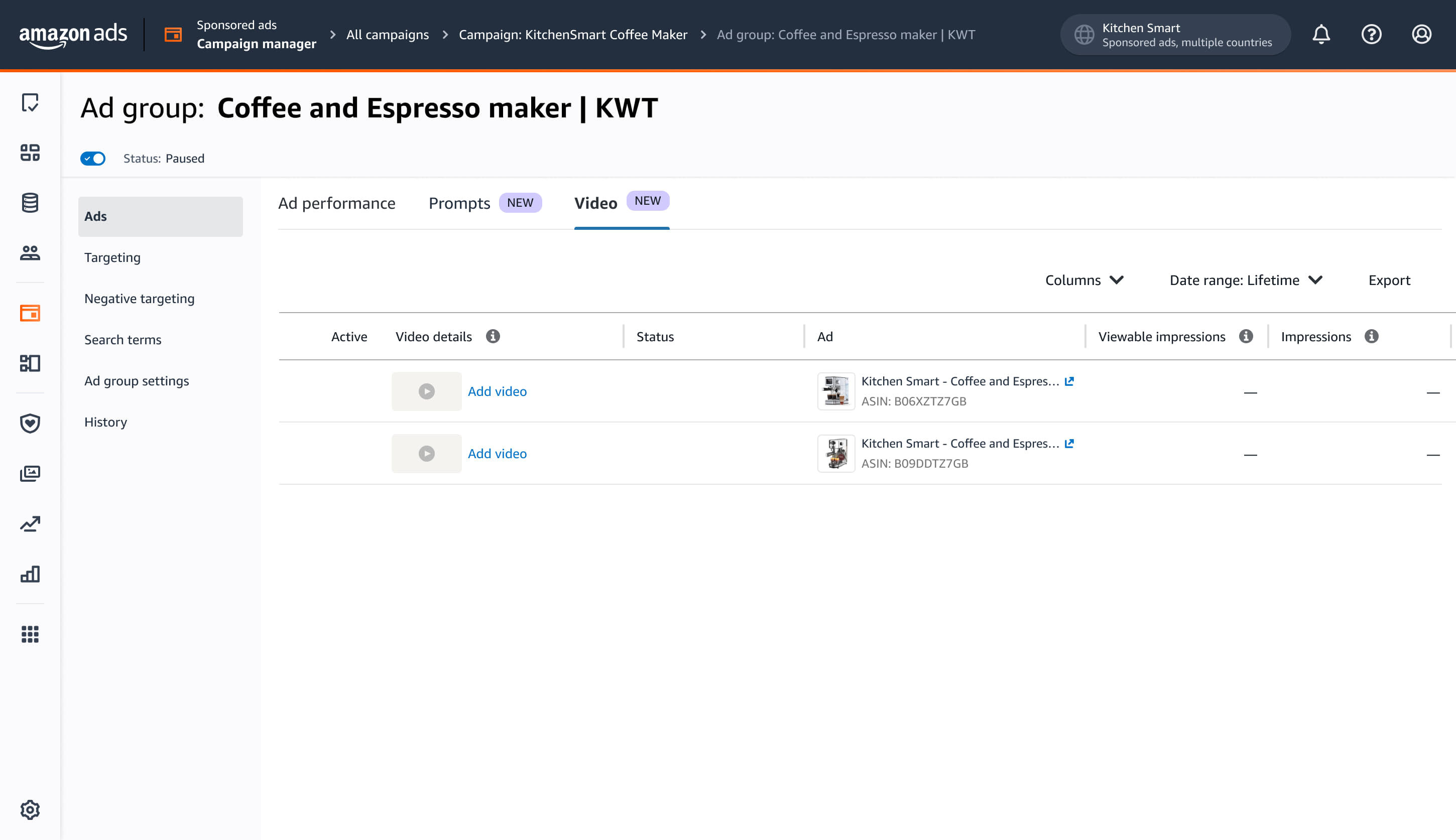
Go to Video tab in Ads Console to add videos to your existing campaigns
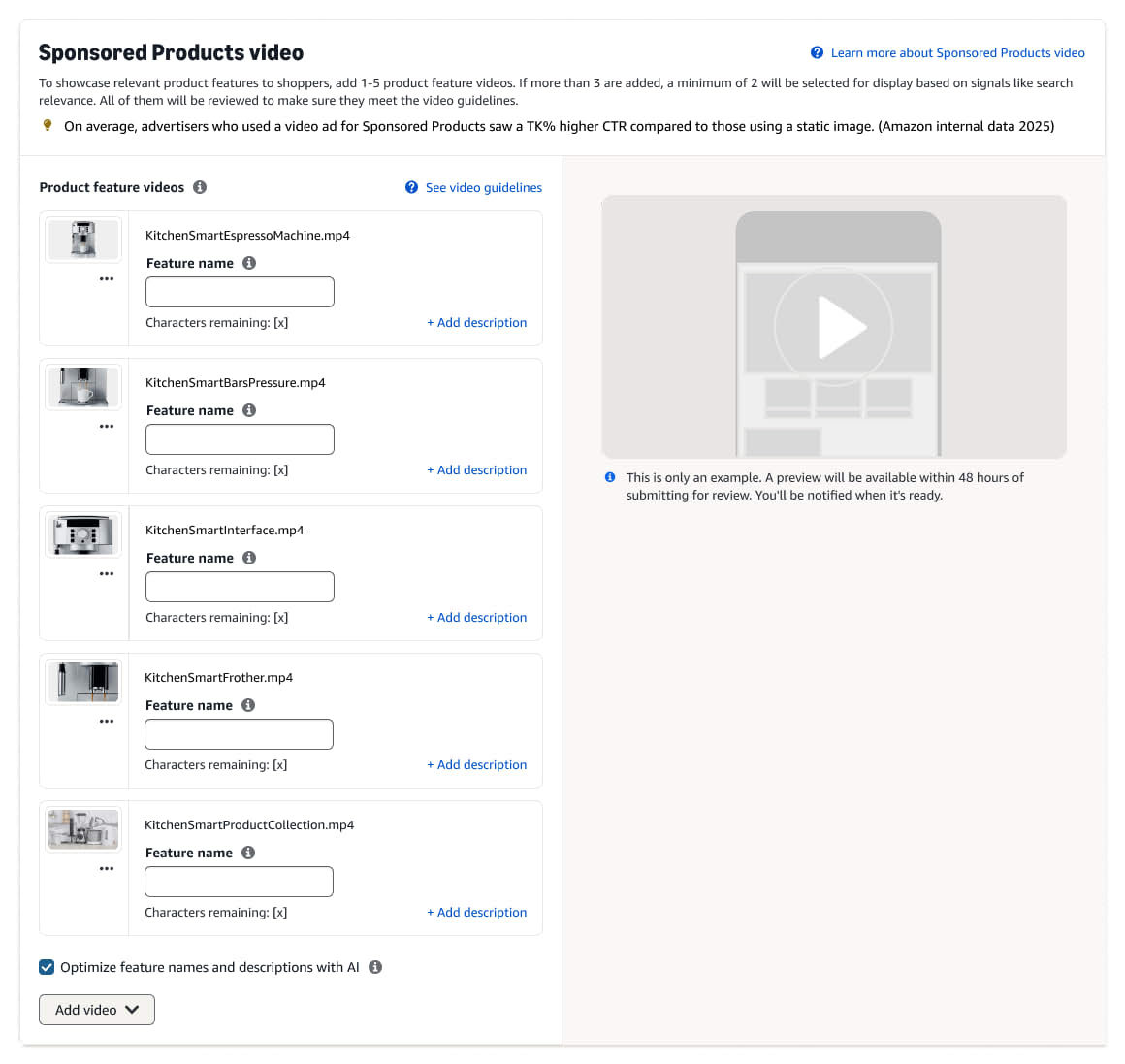
Add videos with feature names and description. Optional checkbox to optimise names and description with AI.
All new video submissions are moderated by the Ad Trust Operations (ATO) team per Amazon Advertising Guidelines and Acceptance Policies and videos must meet general the Sponsored Products video guidelines. Ads that do not meet these policies will not be accepted. Previously accepted videos in the Asset Library are available for re-use. Changes can also take up to 48 hours to show in preview.
You can opt-in to use AI to help you optimise feature names and descriptions. This text optimisation may also be used to create more relevant text based on the shopper behaviour. To opt-in, click the “optimise feature names and descriptions with AI” checkbox.
| Video upload count | 1 to 5 |
| Video length | 7 seconds and longer |
| Layout | horizontal (16:9); vertical (9:16) to be available in 2026 |
| Resolution | 1920 x 1080 px (16:9) recommended |
| Formats | .MP4 or .MOV |
| Audio | No audio. Audio will be removed. |
| File size | ≤ 500 MB |
| Video content | • Each video shows product features, benefits or usage • Product-in-use videos should focus on the product and ideally showcase a human interacting with and using the product • The product should take up 50% or more of the video frame • Show a person interacting with the product to increase engagement |
| Video policy | • No blurry frames, slideshows and letter boxing • No explicit branding or logos unless it’s on the product • No emojis and emoticons • No nudity • No audio (videos with audio will have the audio removed) • No “talking head” videos (i.e., video that requires script or caption explaining the product) |
| File labelling guidelines | • Single videos for a single ASIN: must have clear labels in the following format: (i.e., 00:00 - 00:07: “Product in use,” 00:08 - 00:14: “Waterproof,” etc.). Single videos should be taken in similar lighting, conditions, etc. to avoid harsh transitions • Multiple videos for a single ASIN: must have labels and ASINs in the upload name (i.e., “ASIN 0000001,” “Product in use“), (“ASIN d0000002,” “waterproof”). |
To set up your videos for success, download the Creative Toolkit to view category best practices.
On top of existing campaign reporting available for Sponsored Products, you will be able to download a Sponsored Products video report that includes metrics such as: placement, impressions, clicks, click-through rate (CTR), view-through rate, order, sales, return on ad spend (ROAS), 5-second view and 5-second view rate. Define your core success metrics such as CTR, conversion rate (CVR), ROAS, and video view rate and continue to optimise both engagement and conversion.
Optimisation is only as good as your readouts. Use insights from your campaigns to guide your next creative, targeting and budget decisions. Here are four pro tips to help you drive successful Sponsored Products video campaigns:
As the video is integrated into the ad group using the same targeting and budget controls, there is no set allocation on how much of the campaign is displayed with video format vs. image as the campaign will surface the most relevant based on shopper search query and browsing history. Advertisers, however, will be able to download a ‘Video’ report that includes specific metrics for Sponsored Products video such as: Video details, Placement, Impressions, Clicks, Click-through rate (CTR), Order, Sales, ROAS, 5-second view, 5-second view rate - to understand performance on video ads.
Sponsored Products video works on a cost-per-click (CPC) basis. You will be charged once per click on the video or the associated ASIN leading to the product detail page.
We recommend viewing the Sponsored Products video guidelines and using available resources to effectively demonstrate your product features. You can use our self-service tools* or get help from Amazon Creative Services.
You will be able to upload the video at the child ASIN level. For example, you will be able to upload one video per ASIN colour or variation to ensure your video accurately reflects the same colour or product variation as shown in the product detail page.
A preview will be available within 48–72 hours of submitting for review. You will be notified on the Ads Console notification bell when ready for preview.
Low video quality, video relevance (i.e., feature title or description doesn’t match video content), or videos that do not follow Sponsored Products video guidelines could be the rejection reason. You will be provided with additional guidelines for making changes on Ads Console. Upon re-submission, the review can take up to 24–48 hours to approve. To ensure your videos are set up for success, please review video guidelines and creative best practices sections above in advance.
You can use the same keyword settings as the ad group you are adding the videos for. Learn more in the targeting guide.

Already a registered advertiser? Sign in.*
Sources
1–2 Quadrants Strategies Amazon Video Experience Shopper Study, US, 2025.
3 Amazon Internal data, US, June 2026.
4 Amazon internal data, US, March 2026.
5 Amazon Internal data, US, May 2026.