GUIDE

    A complete guide to Sponsored Brands and display ads moderation

    Moderation is how we ensure your ads are of the highest standards and more likely to make an impact with your customers. This guide will walk you through the policies that can help your Sponsored Brands and display ads drive better results.

    Lorem ipsum dolor sit amet, consectetur...

    Lorem ipsum dolor sit amet, consectetur...

    Lorem ipsum dolor sit amet, consectetur...

    Lorem ipsum dolor sit amet, consectetur...

    Introduction to moderation and our policies

    Our policies are designed to benefit you and your customers. They make sure your ads are working their hardest, showing your product at its best, and communicating your message to encourage greater click-through and purchase.

    What is moderation?

    At Amazon Ads, we have a moderation process that reviews our self-service advertising solutions, like Sponsored Brands and display ads, before they are published on our site. Moderation can help ensure that your ads are displayed at their best to make the most impact.

    Our focus is safeguarding the audience’s experience while also supporting our advertisers. All moderation follows customer-obsessed policies, and our team is trained to help implement the highest standards.

    What happens if my ad is rejected?

    If your ad is rejected, you’ll receive an email explaining the reason so you can revise it and resubmit it. If that happens, review the policies in this guide and on our site to learn how to adjust your campaigns and optimise your ads going forward.

    Timing is everything

    Submit your ads at least one week in advance of your launch date to allow time for approvals and possible resubmissions.

    You can also save time and plan ahead by pre-moderating your creative assets. Select assets in bulk (e.g. for events like a new product launch), submit them for moderation, and then have them ready to use for future ad campaigns or Store pages, all within your asset library. The moderation status can be found within your asset’s details and you can filter to find moderation-approved assets for use in your campaigns.

    Amazon reserves the right to reject, remove or request modifications to an ad at its sole discretion, for any reason. Amazon may suspend or terminate your ad account(s) for severe or repeated Ad Policy violations. All examples are illustrative, and Amazon reserves the right to reject campaigns that do not meet its policies as determined at its sole discretion. For those policies that require prior approval by Amazon, please engage your appropriate client support team.

    Policies overview

    These are the general requirements for advertising.

    Your ads must:

    • Be suitable for a general audience
    • Be honest about your products or services
    • Avoid content that may mislead or offend customers
    • Accurately reflect the content of your product detail page so what customers see is correct before clicking an ad or deciding to make a purchase
    • Be in the primary language of the Amazon site where the ad appears
    • Be clear and easily understandable to a wide audience
    • Only promote products that you own or are authorised to resell or distribute

    Our policies are not intended as legal advice. It’s your responsibility to make sure you comply with all applicable laws, rules, regulations and industry standards in each geographic area where your advertisements may appear. Consult with your legal advisor if you have questions.

    Please note, this list does not contain our full ad policies. For additional details, see Amazon Ads Guidelines and Acceptance Policies

    Amazon periodically updates our policies. Check our Ad Policy Change Log regularly to make sure your ads are always up to date.

    Claims and substantiations

    Your ads must be truthful and accurate, and that goes especially for any claims you make.

    Advertising claims have to be the same ones as on your product detail page. Claims on the product detail page, in the headline and/or on the product packaging will also require proof and substantiation.

    Prohibited and restricted content, products and services

    We want our customers to have the best experience possible when they visit Amazon, so our policies ensure that the products and services we advertise the content of our ads are appropriate for customers and follow local laws, regulations and industry best practices.

    To that end, not all products, services or content is eligible for advertising. These products fall under our prohibited category, and any related advertising will not be published.

    Prohibited content includes content that’s inappropriate, dangerous, offensive, illegal or violates our editorial guidelines. See the full list of prohibited content.

    Prohibited products and services are those we don’t allow to be advertised. See the full list of prohibited products and services.

    Restricted content, products and services are those that we permit, but with specific requirements and guidelines. Generally, these are related to the health and safety of customers, and/or sensitive topics and categories like weight loss and health care. There may also be local and regional guidelines that need to be followed.

    Policies overview checklist

    Your ads must:

    • Be suitable for a general audience
    • Be honest about your products or services
    • Avoid content that may mislead or offend customers
    • Accurately reflect the content of your product detail page so what customers see is correct before clicking an ad or deciding to make a purchase
    • Be in the primary language of the Amazon site where the ad appears
    • Be clear and easily understandable to a wide audience
    • Only promote products that you own or are authorized to resell or distribute

    To-do list:

    Branding and logos: How to build a brand presence

    Here are the guidelines on presenting your brand in a way it can stand out.

    Logo dos and don’ts

    Your logo is your brand’s signature. It represents what your products are, how they perform and what needs they satisfy. When shoppers see it, they should immediately recognise it and all that your brand stands for. So, your logo needs to have a strong, clear presence.

    A brand logo must be your brand’s registered logo. You have to have the legal right to use the logo of the brand you’re promoting to use the logo in your ads.

    Your logo should:
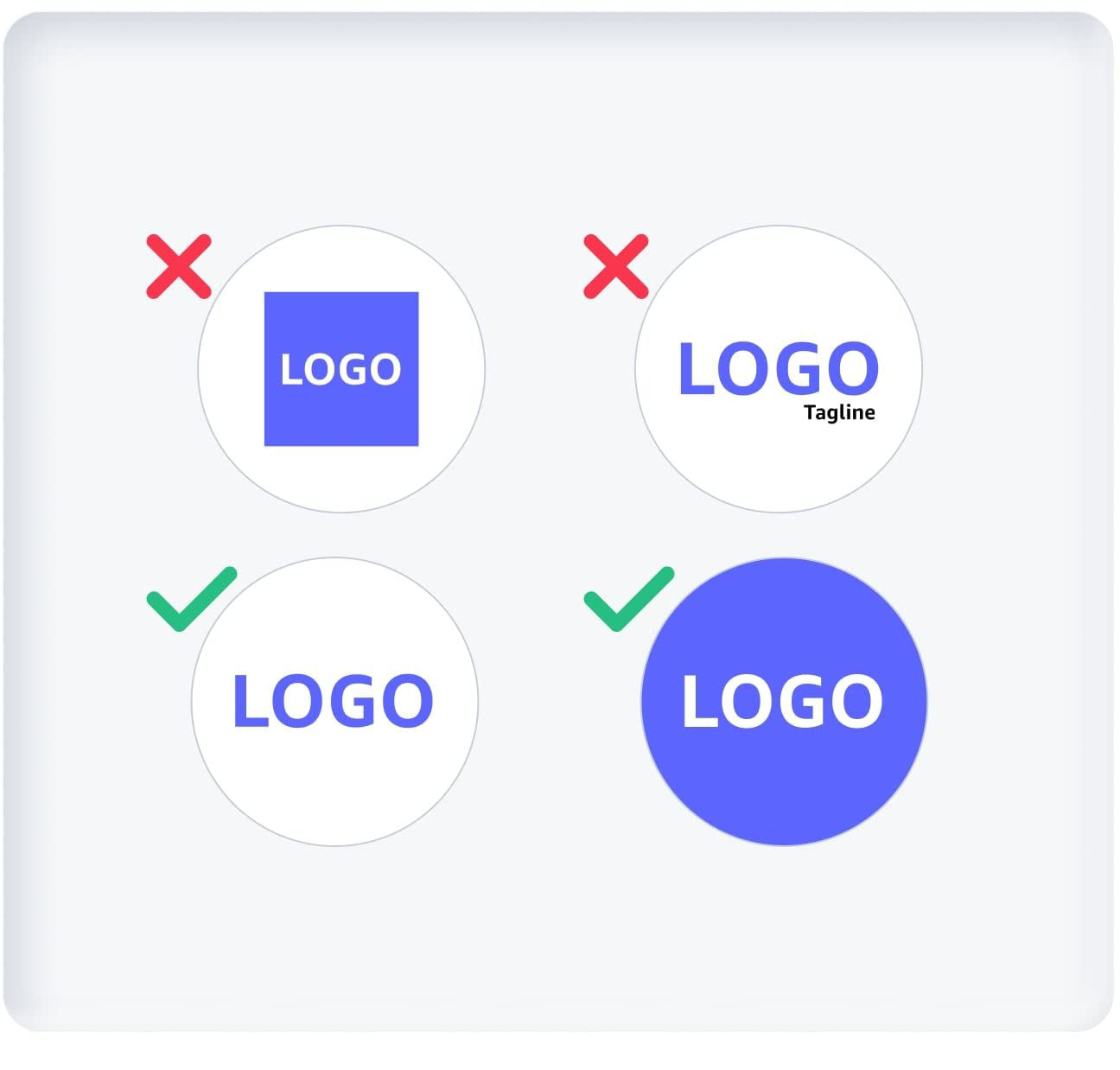
    Logo dos and don’ts examples
    • Fill the entire image or be on a white or transparent background
    • Accurately reflect the brand or product that you’re promoting
    • Use text that’s legible on mobile and desktop
    • Be consistent across all ads so customers recognise your brand right away

    Your logo should not:

    • Be a product, ASIN (including cropped versions), custom or lifestyle image or combination
    • Be used as an extension of the headline or contain additional text
    • Be a combination of logos
    • Contain crowded or cluttered elements
    • Appear on a complex graphical background

    Logo best practices tip:

    Logos may appear in different sizes, on different devices and against different backgrounds. It’s important to take this into account when uploading your logo.

    Learn more about logo requirements.

    Amazon brand elements

    Using the Amazon name or branding elements can help you get results. But as the Amazon brand is one of our most valuable assets, all Amazon branding elements must follow our brand usage guidelines. Ads must not look like, mimic or be mistaken for Amazon content.

    We permit our advertisers to use Amazon branding elements with written approval. All materials must be submitted to Amazon in advance for review, so factor that into your timing.

    Uses of Amazon trademarks or other references to Amazon or its products must comply with the brand usage guidelines.

    Branding and logo policies checklist:

    • The logo is easily recognisable
    • The logo is easy to read
    • The logo is clean and clear, and lacks cluttered elements
    • The logo is the same on all ads for consistency
    • The background is white or transparent
    • The brand name matches the brand logo
    • The logo is not a combination of logos
    • The logo is not used as an extension of the headline
    • The logo does not contain additional text
    • The logo is not a product, ASIN (including cropped versions), custom or lifestyle image or combination
    • Amazon branding elements follow brand usage guidelines

    Imagery guidelines: How to make a good impression

    Images are the first thing customers see in an ad, so make sure your images display your brand and your products in the most appealing and compelling manner.

    Image quality

    Images should be the highest image resolution possible of 72 ppi. We want to make sure your product appears at its absolute best, which is why low-quality images will be rejected. Your images must meet our resolution specs, as well as file size and file type requirements per size/placement.

    Low-quality images include:
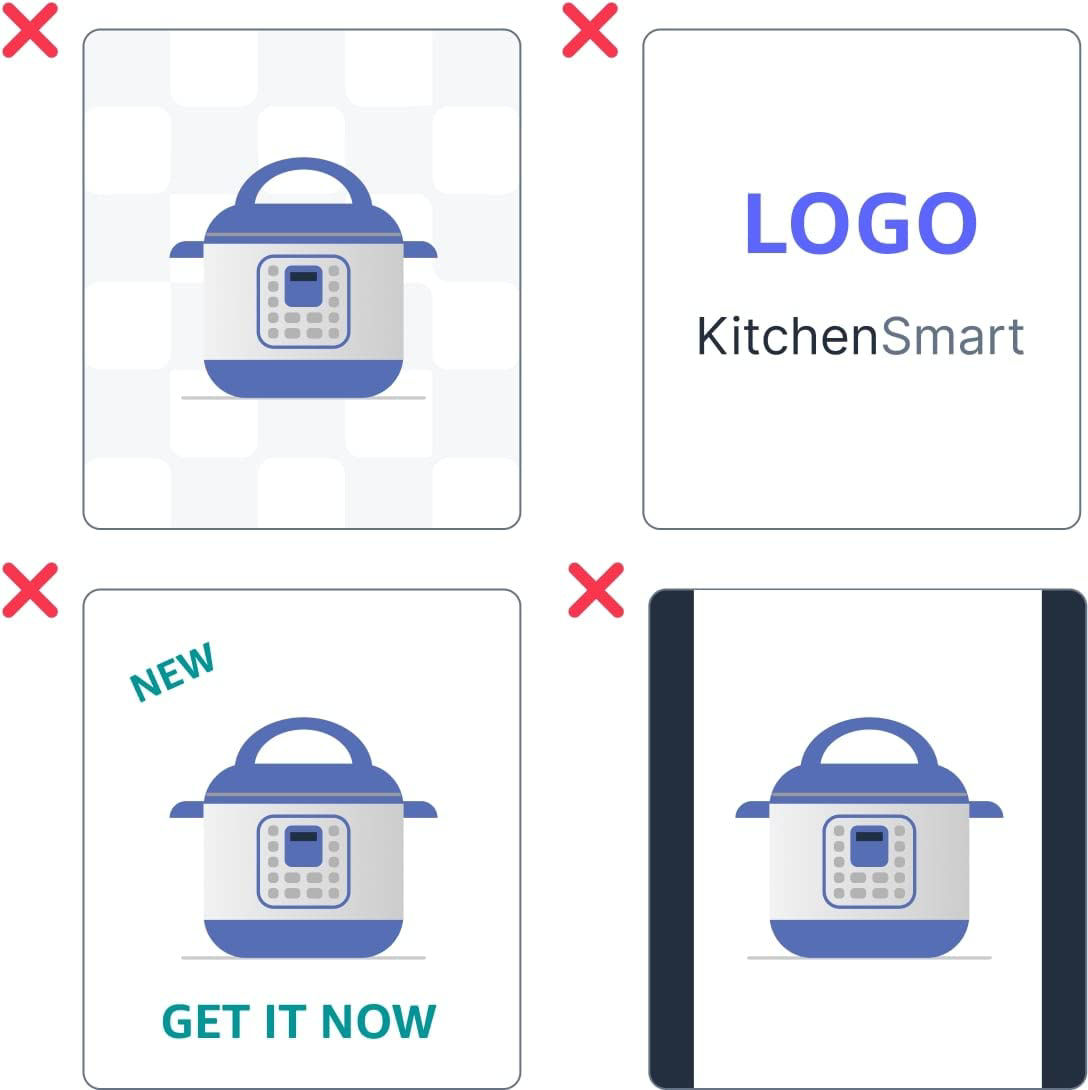
    Low-quality image examples
    • Crowded or cluttered images with too many visual elements
    • Blurry, distorted, pixellated, smudged or stretched images

    Custom images

    Custom images represent your brand and products in context or a lifestyle setting, and show how your products add value to customers’ lives and how customers will experience them.

    Make your brand look its best

    • Use high-quality images that are appealing and engaging.
    • Use photos or graphics that show how your brand fits in real life.

    Demonstrate that your products are for everyone

    • Use diverse models, such as people of all races, ages, body types, ethnicities and gender identities.
    • Build assets that work well everywhere, across devices, placements and regions.
    • Avoid inappropriate content like frightening, violent or gory images.

    Be consistent

    • Make sure the product, pricing and claims in the ad are the same as on your landing page.

    Images must not:

    • Be individual or multiple product images on a solid or transparent background
    • Be an individual brand logo or combination of logos
    • Be one of your selected product images
    • Contain additional text other than text that naturally belongs in the image (such as on product packaging)
    • Contain letterbox or pillarbox formats

    Images best practices tip:

    Make sure your product is prominently displayed, either in use or on its own, and that it’s an accurate representation to better attract shoppers and set up their expectations.

    Background colours and borders

    Amazon’s policies on background colours and design help ensure your advertising stands out and customers can clearly identify where to click on your ad.

    Ads without borders

    Ads without borders cannot have a white or off-white background colour. They must have a background colour that contrasts with the white/off-white background colour of that page to make sure they’re recognisable as an ad and not as part of the page.

    For example, ads without borders can feature a light grey background colour.

    See individual specs for more details about background and border requirements per ad product.

    Image and visual policies checklist:

    Image quality:

    • Is the highest resolution possible at 72 ppi
    • Is aesthetically appealing
    • Lacks cluttered, crowded elements
    • Is not blurry, distorted, pixelated, smudged or stretched
    • Meets resolution, file type, file size specs

    Custom imagery:

    • Uses diverse array of models and images to represent the general audience
    • Demonstrates how the product and brand fit into customers’ lives
    • Lacks inappropriate content and is not frightening, violent or gory
    • Can work across devices, placements and geographies
    • Does not contradict the landing page
    • Does not contain individual or multiple product images on a solid or transparent background
    • Is not an individual brand logo or combination of logos
    • Is not one of your selected product images
    • Does not contain additional text other than text that naturally belongs in the image (such as on-product packaging)
    • Does not contain letterbox or pillarbox formats

    Ads without borders:

    • Do not have a white or off-white background colour
    • Do not feature a background colour that contrasts with the white/off-white background colour of the page it’s on

    Need creative development help?

    If DIY-ing a creative for an ad campaign seems too daunting, find an expert who can develop high-quality content for you. Our partners can help compose, design and execute campaigns that meet our guidelines, specs and best practices while also providing strategic guidance and optimisation. Find a partner that’s right for you through our partner directory.

    Advertising copy and content: Getting your message across

    In advertising, what you say and how you say it is critical to capturing customers’ attention. Spelling and punctuation count, so does being accurate and honest. Here are our guidelines for copy that won’t get rejected.

    Copy and content dos and don’ts

    It’s not just what you say in your ads, but how you say it, spell it and punctuate it.

    Use your grammar and spell-check tools

    Spelling, typos and grammar issues are some of the top reasons ads are rejected. These simple errors may make you look unprofessional, which can undermine confidence in your product. So, proofread copy before submitting it for review, use grammar and spelling tools, and/or have someone proof it for you.

    Be mindful of punctuation

    Proper punctuation is required. Repeated question (???) or exclamation (!!!) marks or excessive ellipses, generally more than two instances per headline, must not be used.

    Correct:

    Looking for a sectional sofa?

    Correct:

    Check out our sectional sofas, loveseats… and more!

    Incorrect:

    Looking for a sectional sofa????

    Incorrect:

    Check out our sectional sofas…loveseats…and more!!!

    Speak your customers’ language

    Make sure your ads are in the primary language of the site where they appear

    Capitalise correctly

    For self-service ad products, uppercase usage follows the sentence-case format. You should only capitalise the first word in a headline, sentence, any proper nouns or trademarks (including official brand names, product models or slogans).

    Correct:

    Sentence case: Check out our sectional sofas

    Title Case, ALL CAPS, tOGGLE cAse and MIXED case are not acceptable and will be rejected.

    Incorrect:

    Title case: Check Out Our Sectional Sofas

    Mixed case: Check out our SECTIONAL SOFAS

    Toggle case: CHecK OuT ouR SeCTIonal SOFas

    All caps: CHECK OUT OUR SECTIONAL SOFAS

    Special characters

    The use of special characters, such as numerals, *, @ and full-stops in place of letters or to shorten words is not permitted.

    Examples

    Correct: Hate stains?

    Correct: Best ever

    Correct: without

    Incorrect: H8 stains?

    Incorrect: B.E.S.T. E.V.E.R

    Incorrect: w/out

    Character exceptions

    Special characters are allowed only where:

    • They’re part of the brand, product or slogan.
    • They’re in accepted use to define a word or phrase, such as AC/DC or AM/PM or used as symbols like “$” for US dollars or “#” for numbers or hashtags.

    Editorial best practices

    The role of an ad is to get customers interested enough to click. Following these tips will help your copy inspire them to take action.

    Set up expectations

    • What you say in your ad must be what customers see on your landing page.
    • Emphasise your product in the headline and text.

    Keep it simple

    • Use words that are easy for everyone to understand.
    • Get to the point faster with straightforward sentences.

    Give customers a reason to click through

    • Focus on the value the product has for the customer.
    • Explain why the product is unique.

    Stay relevant to everyone, everywhere

    • Focus on all regions or audiences where your product is relevant.
    • Avoid using personal language, such as you or your, as it can sound inappropriate (e.g. “Use our supplement to solve your weight issues”).

    Content prohibitions

    These approaches to content are definite don’ts and will get rejected during the moderation process, so take note.

    Don’t fake it

    Fake functionality occurs when certain elements in an ad are designed to look clickable when they’re not, or when ads that ask for a postcode don’t lead to a landing page with information tailored to that customer’s region.

    Don’t provide misleading claims or content

    It might be tempting to use claims like “The best sewing machine”. Superiority claims (the best, the most, the biggest, the tastiest, better than, etc.) will be rejected unless they can be substantiated.

    Ads should accurately reflect the landing page and the products you’re selling. They must contain the same exact offers and products.

    For example, we’d reject an ad with an image of floor polish and the copy “Save on household supplies” that leads to a landing page for vacuum cleaners.

    Don’t use competitive language

    Ads on Amazon cannot explicitly call out your competitors by name. You may include references to a “leading brand” or other generic phrasing.

    Don’t put the pressure on

    Copy that pressures customers is prohibited. Ads must engage customers without appearing to shout at them.

    Ads must not contain:

    • Language that creates a sense of urgency

      • Hurry while supplies last!

    • Repeated exclamation or question marks.

      • Don’t miss out!!!!

      • Are you ready????

    • Any end punctuation in calls to action

      • Shop now!

      • Want to find out more?

    • Any combination of two or more of the following: ALL CAPS, punctuation marks and/or large font sizes.

      • UNMISSABLE SUMMER DEALS!

    Don’t use distracting ads

    Animation and other interactive elements cannot trick or deceive customers or be distracting. Prohibited distracting features include, but are not limited to,

    • Flashing, blinking or pulsating objects, images or text
    • Excessive animation (for example, frame changes occur every one or two seconds or visual objects within the animation move constantly)
    • Animation that mimics user interaction, such as moving mouse cursors or clicking buttons

    Don’t promote unavailable items

    Ads must not promote the sale of products that are out of stock or under recall, or services that are unavailable for purchase at the time that the campaign runs.

    Ads must be paused when the product or service promoted becomes unavailable.

    Ads for products that are only available for pre-order are permitted if it is clear in the ad by using a “pre-order” call to action (CTA).

    Promotion and festive messaging

    These guidelines are designed to set correct customer expectations and help you define reasonable start and end times for events and festive season promotions.

    Speaking of savings

    Don’t over-promise when referencing promotions. Superlatives like “Huge savings” or “Gigantic discounts” are not permitted. Neither are mentions of specific pricing, like “Save 50%” or “$20 off”.

    Instead, stick to messaging and close variations like:

    • [Name of Product] savings
    • Savings on [Product]
    • Save now
    • Great prices on [Product]
    • Great savings on [Product]
    • Great bundles on [Products]
    • Buy [Product] and get [additional Product free]

    Promotional copy in an ad must also be on the product detail page, for example lightning deals, and valid for the length of the campaign.

    You can only use the words “Deal” or “Deals” in your ads if your products have an Amazon deal, such as Deal of the Day, live for the duration of your campaign.

    It’s all in the timing

    Ads promising savings can’t run when the offer or savings aren’t available. Ad campaigns must be scheduled to end on or before the last day of the promotions. If you extend your ad campaign after the offer or savings period ends, all promotional messaging must be removed.

    Holiday-specific guidelines

    Festive season promotional campaigns must start within a reasonable time leading up to the event, must not be months in advance and must end within 24 hours after the event date or a reasonable time after that.

    • For instance, promotions for festive events in December can’t start in August and end in February.

    For full details and requirements, see Promotional and Holiday Guidelines.

    Advertising copy and content checklist dos and don’ts

    Dos

    • Proof copy for grammar and punctuation.
    • Use sentence-case format.
    • Use words that are easy for everyone to understand.
    • Make sure ads reflect landing page contents and contain the same offers and products.
    • Focus headlines and text in images, and video on the product.
    • Emphasise why the product is unique and how it helps the customer.
    • Make sure any promotional copy is also on the product detail page and valid for the length of the campaign.
    • Make sure the start and end dates of your promotional ad campaign are the same as the start and end dates of your promotion.

    Don’ts

    • Don’t use special characters like numerals, @, * and full-stops unless they’re part of the brand or slogan or in popular use (like $ and #).
    • Don’t mention a specific region or group.
    • Don’t use personal language, such as you or your.
    • Don’t use fake functionality and misleading content that can trick customers or drive them to the wrong page.
    • Don’t use superiority claims (the best, the biggest, better than) or mention competitors by name.
    • Don’t use pressuring language or punctuation.
    • Don’t promote unavailable items.
    • Don’t use distracting, flashing, blinking or excessively animated ads.
    • Don’t over-promise or use superlatives such as “Huge discounts” in promotional messaging.
    • Don’t use the words “Deal” or “Deals” in ads unless the products have an Amazon deal that is live for the duration of your campaign.

    Languages: Guidelines for ads that go global

    Taking your ads beyond borders and around the world means making sure your customers are able to connect with communications.

    Speak your customers’ language

    We want to make sure that wherever you advertise, customers understand your message. That’s why we require all ads to be in the primary language of the site where they appear.

    Official slogans, branding and taglines are not required to be translated, but all other copy and content must be in the language where the ad is displayed.

    Need translation support?

    Amazon Ads localisation services is a new one-stop destination to localise branded content to help your brand expand to new locales. This translation service is supported by professional linguists who assist you with translating content for your campaigns.

    We offer the translation service for both text and video formats. Please note this service is not available in all countries.

    The video translation service allows you to translate videos for your Sponsored Brands video ad format campaigns and avoid two of the most common campaign rejection reasons: using an unsupported language in the country you want to launch the ad in, as well as grammatical errors and mistakes.

    The text translation service allows you to translate headlines for your Sponsored Brands and display ads campaigns or brand copy for your Brand Stores or A+ content.

    To access Amazon Ads localisation services, navigate to “Creatives” on the left-side navigation bar within the advertising console, select “Creative services” and filter for “Translations”.

    Text: Submit text content in English, French, German, Italian, Simplified Chinese or Spanish (Spain), up to 1,000 characters, in a single request and translate to Arabic, Dutch, English (United States and United Kingdom), French, German, Italian, Japanese, Polish, Portuguese, Spanish (Spain and Mexico), Swedish and Turkish within 10 days.

    Video: Translate video creatives from English, French, German, Italian and Spanish (Spain) to Dutch, English (United Kingdom), French, German, Italian, Japanese, Polish, Spanish (Spain and Mexico) and Swedish. You’ll receive a video with embedded subtitles for both audio and on-screen text within 10 days.

    Sponsored Brands

    Sponsored Brands ads help drive awareness of your product portfolio with tailored ads that appear in Amazon shopping results. Here, find the specs and standards on formats, CTA usage, keywords and other details required for moderation approvals.

    Ad formats and functionality

    Below are the guidelines and format sizes specific to Sponsored Brands advertising:

    • All images must be the highest image resolution possible at 72 ppi.
    • Images and text must be legible.
    • Creative assets and imagery cannot obscure or interfere with the legibility of ad templates.

    Note: Animation is only allowed in videos. For Sponsored Brands video guidelines, check out Chapter 7.

    Sponsored Brands formats:
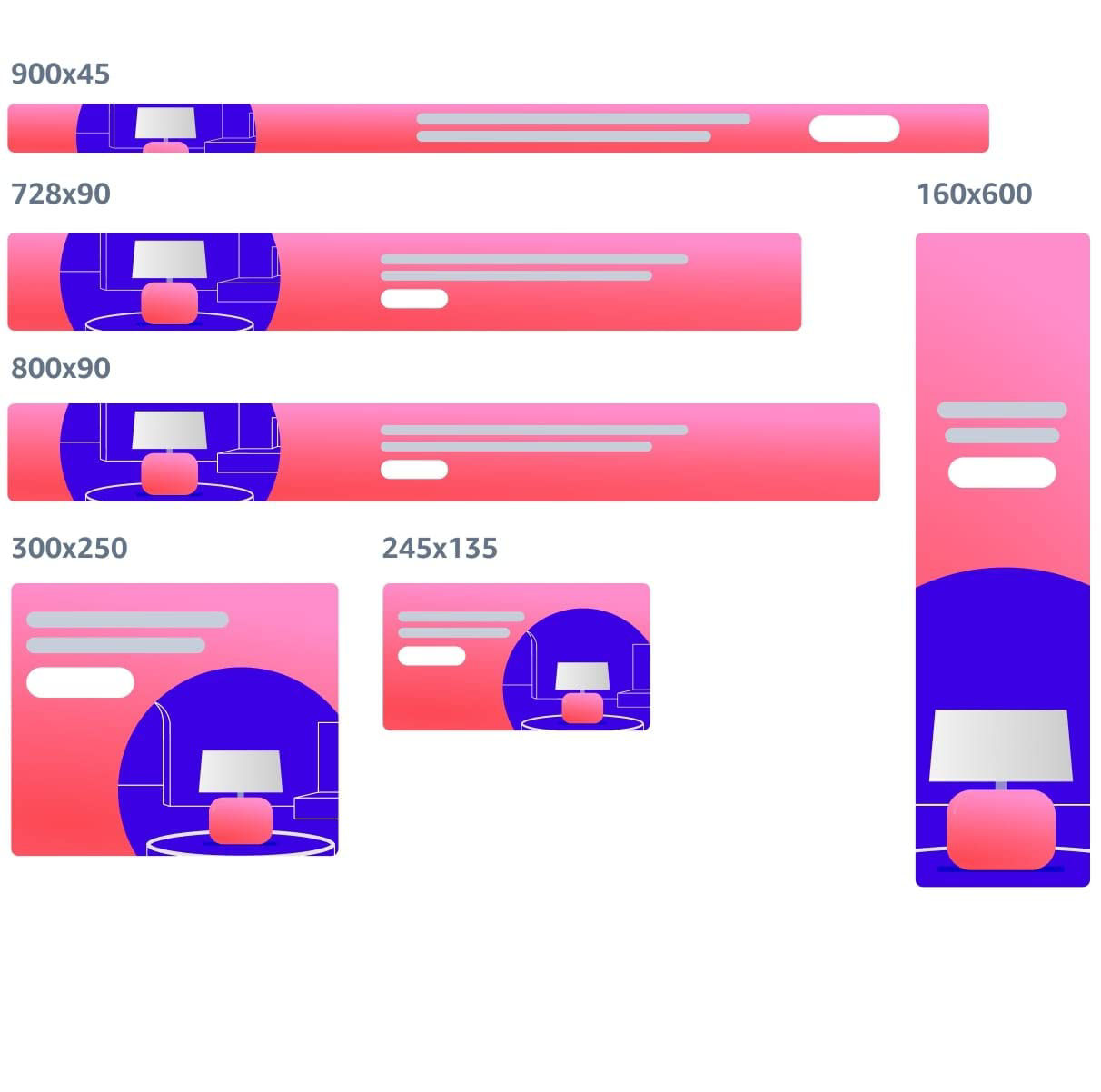
    Sponsored Brands ad formats
    • 728 x 90
    • 800 x 90
    • 300 x 250
    • 160 x 600
    • 245 x 135
    • 900 x 45

    CTA (call to action) usage

    A CTA is a short, two- or-three word phrase that can help motivate consumers to take the next step and click on an ad to see the details about your product. They need to be direct and explicit, and reflect the experience a customer can expect on the landing page. Non-specific CTAs such as “Click here” are prohibited.

    We don’t require CTAs in advertising, but it’s a smart idea to use them as they improve advertising performance.

    Examples:

    • “Shop now”
    • “Learn more”
    • “See more”
    • “Get details”
    • “Get more information”
    • “Discover more”

    If used in your headline ad copy:

    • Be clear and precise
    • Don’t use language that pressures customers, such as “Act now”, “Last chance” or “Don’t miss out”.

    Placement-specific CTA requirements

    Ad typePolicy
    Billboard (970 x 250)CTA cannot be button-shaped
    Mobile (all ads)CTA encouraged but not required

    Translations

    If your campaign appears on sites in languages other than your default language, we’ll translate your custom text like headlines and CTAs automatically once you’ve submitted it. Translation times may vary and are usually complete within 24 hours of your default language campaign going live.

    Ads you translate yourself must have the same meaning and match the content of the ads in your original, default language campaign. Translated content must also follow the content requirements covered in this guide. Review of translated campaigns usually takes up to 72 hours.

    Learn more about translations and supported languages in the Support Centre of your advertising console.

    ASIN and product images

    ASIN images showcased in your ads must comply with our policies and the Amazon Site Standards for Product Images. GIFs or animations are not permitted.

    Duplicate or identical product images within the same ad are not permitted. ASIN images within the ad must be or refer to the product being sold.

    Images must clearly show all the product variations, such as colour, model or style.

    Keyword and product targeting

    The keywords or products targeted in your ads must be relevant to the product being promoted.

    Ads must not use keywords or targeted products that could result in an offensive, insensitive or undesirable audience experience.

    Some examples of restricted product categories and keywords are:

    • Offensive, profane or vulgar keywords or products
    • Prescription medicine keywords or products, such as "Lipitor" or "prednisone”
    • Products and keywords of products that we do not advertise, such as e-cigarettes or sexually explicit and adult products

    See our prohibited products and content policies for full details.

    Amazon programmes/Subscribe & Save

    Our Subscribe & Save programme lets Amazon customers sign up for recurring scheduled deliveries of products that they use frequently.

    If the products in your ad are offered as part of the programme, and you mention Subscribe & Save in an ad headline, you must use the original, unadjusted Subscribe & Save logo and/or name. Customized or abridged logos or references are not permitted.

    Sponsored Brands checklist

    • All images must have a high image resolution
    • Ensure images and text are legible.
    • If using a CTA, make sure it’s direct, clear and precise.
    • Don’t use pressuring language like “Act now” or “Last chance” in a CTA.
    • Ads you translate yourself must have the same meaning and match the content of the ads in your original, default language campaign.
    • Duplicate or identical product images within the same ad are not allowed.
    • ASIN images within an ad must be or refer to the product being sold.
    • Optimised ads must contain general headlines that don’t mention specific products.
    • Don’t use keywords that could result in an offensive, insensitive or undesirable audience experience.
    • Use the original, unadjusted Subscribe & Save logo in ads for products in that programme.

    Display ads

    Display ads provide a great opportunity to connect with customers who are interested and actively shopping in your product category, especially as ads can be placed anywhere they spend their time.

    Make sure THAT your ads follow the following guidelines:

    • All images must be legible and at the highest resolution of 72 ppi.
    • Text, visuals and content do not interfere with legibility of ad templates.
    • All ads must be static unless using video format for display ads.

    CTA (Call to action)

    There’s no need to create your own CTA as display ads dynamically incorporate CTA elements by default. So additional call-to-action (CTA) buttons or text are not permitted.

    Display ads must also comply with the policies presented in this guide, specifically chapters 1, 2, 3, 4 and 5. For full details, see Amazon Ads Guidelines and Acceptance Policies.

    Display ad creative sizes:

    Mobile web and mobile app:

    • 300x250
    • 414x125
    • 320 x 50

    Desktop:

    • 320 x 50
    • 300 x 250
    • 160 x 600
    • 300 x 600
    • 650 x 130
    • 728 x 90
    • 970 x 250
    • 980 x 55

    Display ads checklist

    Make sure:

    • All images are legible and at the highest resolution of 72 ppi.
    • Text and visuals don’t interfere with the legibility of ad templates.
    • Your ads are static, as animated ads are not allowed for display ads.
    • You don’t create a CTA, as that’s already provided by default.

    Video format ads for Sponsored Brands and display ads

    High-quality videos can build trust with shoppers by providing product information they can’t get from images or text alone, like seeing a product’s colours and features up close, watching how it performs, and learning the ways it’s designed to be used.

    All videos must follow the policies presented in this guide, specifically chapters 1, 2, 3, 4 and 5. For full details, see Amazon Ads Guidelines and Acceptance Policies.

    Ads must comply with our ad specs requirements for animated and video ads. Note that animation is only permitted in videos.

    Video must be relevant to the product or brand advertised, and lead to a contextually relevant landing page.

    Ensuring the best visual and audio quality

    Video imagery and sound must be high-quality in order to be approved.

    The most common reasons videos are rejected include:

    • Low image resolution
    • Blurry, unclear, pixilated or unrecognisable visuals
    • Black or blank frames at the start or end of videos
    • Illegible text. The text must be big enough for the average customer to read.
    • The same or similar colour for text and background as the text will not be legible. Example: white text on light grey background.
    • Abruptly edited ending at the maximum video duration
    • Jumpy, jarring, overly fast-paced cuts and edits
    • Distracting, shrill, unexpected or violent, and irritating sounds
    • Sudden changes in volume
    • Unusually high-pitched or low-toned voices
    • Static, crackling or faint messages or unrecognisable sounds
    • Unsubstantiated claims
    • Titles with grammatical errors

    Make sure to review your videos before submitting them. Double-check that the images are distinct and well-defined, and the sound is clear and audible.

    Start with your product

    Make sure your product is front and centre and the video focuses on why the product benefits customers, how it performs and what makes it unique.

    End with your logo

    Customers are more likely to remember your brand when the logo is the last thing they see. Consider having the copy end with a call to action, like “Get the details” or “Find out more”.

    The right timing

    The optimum length for a video to make a lasting impression and keep customers’ attention is between 15 and 30 seconds.

    • Show the product in the first two seconds of the video to make the best first impression.
    • Mention the product’s key benefits in the first five seconds, as that’s when customers are most likely to hear and/or see your message.
    • Keep it brief; limit content to your most important selling points.

    Speak to shoppers in their local language

    • Video text and audio must be in the primary language of the site where the ads are displayed.
    • Subtitles or text translations must be in the local language if audio is in a different language.
    • Important text within the video, such as product information and instructions, must be in the local language.

    Make text easy to read

    Use text that’s clearly visible over the background and keep text on screen long enough for it to be read.

    On-screen text must be easily readable for all types of shoppers. We recommend using text that is a minimum of 50pts (100pts preferred) for 720p and 1080p videos and text that is a minimum of 100pts (200pts preferred) for 2160p videos.
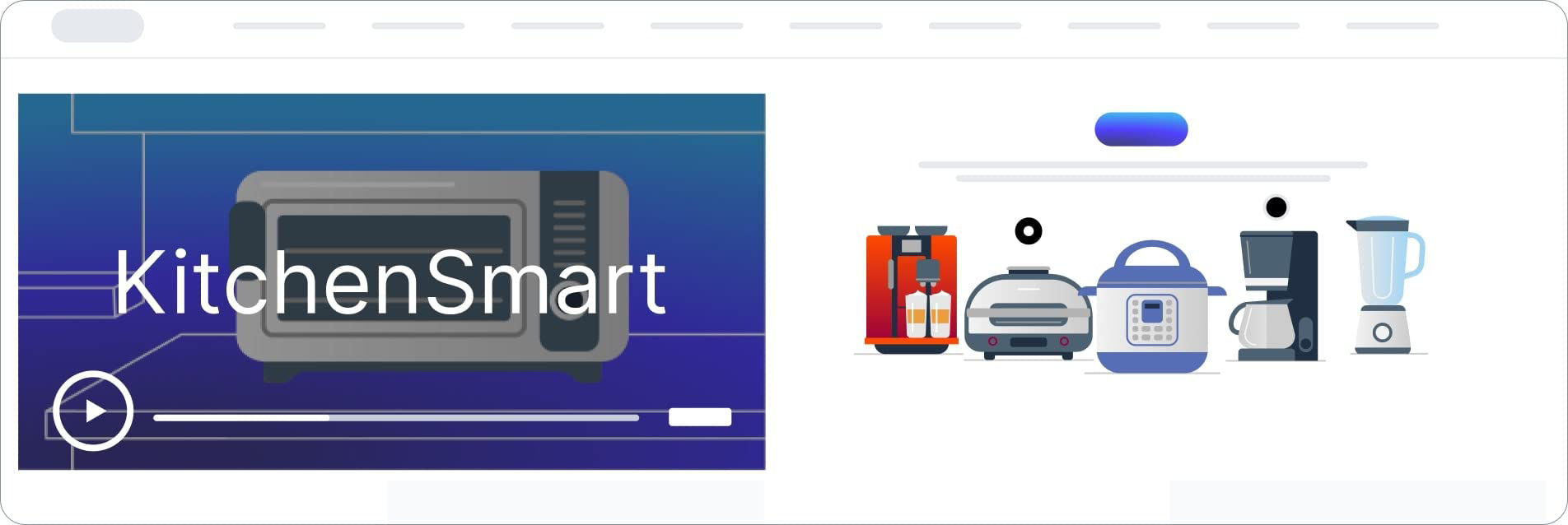
    Video on-screen text example

    Reaching shoppers with, and without, sound

    Video units automatically start playing without sound, and customers have the option to turn audio on and off. To be certain you get your message across, use on-screen text or closed captions and/or present a clear demonstration of how your product works that doesn’t need sound to be understood.

    There’s no requirement that your video has a soundtrack, but it must be clear when the video doesn’t have audio. Use a disclaimer that reads “No audio”, and/or make it obvious that any people in the video are not speaking.

    Mobile considerations

    Consider how different the shopping experience is on mobile vs. desktop when creating your video ad, especially when it comes to:

    • The size of your product, logo or text on-screen.
    • The amount of information you include on-screen.
    • The use of closed captions.

    Our Video Safe Zone templates let you check if on-screen text can be easily read on a mobile device. This visual aid helps ensure that important information, such as subtitles, product disclosures and instructions, are always visible and that the audio button isn’t obscured, so customers have access to the volume controls at all times.

    Set the right frame

    Your videos must fill the available space. They must not have black bars on any side, which means letterbox and pillarbox formats are not permitted.

    In that case, you’ll need to optimise your videos to fit the full size. Be sure when adjusting the video creative not to crop out the product or any relevant information.

    Definite don’ts

    Videos cannot include:

    • Customer reviews, including star ratings, even if these reviews are on Amazon
    • Amazon branding elements, trademarks, products or references to Amazon products or services
    • Deals, discounts or other savings promotions
    • Distracting images, like flashing, spinning, blinking, pulsating objects or text, or high-contrast transitions
    • Pressuring, combative or urgent language intended to elicit a click or a sale from the customer

    Video and audio specifications

    SpecsDisplay ads video formatSponsored Brands video format
    Maximum file size500 MB500 MB
    Aspect ratio16:916:9
    Minimum duration6 sec6 sec
    Maximum duration45s45 sec
    Dimensions1920 x 1080 or higher1280 x 720, 1920 x 1080, or 3840 x 2160
    Minimum video bit rate4 Mbps1 Mbps
    Video frame rate (fps)23.976 (recommended), 24, 25 or 29.9723.976, 24, 25, 29.97, 29.98 or 30 fps
    Minimum audio bit rate192 kbps96 kbps
    Audio sample rate44.1 kHz or 48 kHz44.1 kHz or higher sample rate
    Supported formatsVideo: H.264, MPEG-2 or MPEG-4
    Audio: PCM or AAC
    Video: .MP4 or .MOV
    Audio: PCM, AAC or MP3
    Audio channelStereo or monoStereo or mono

    Remember, your videos represent and reflect your products and your brand. They should be upbeat and positive, as you want customers to feel good about your product, understand why it’s relevant to their needs and how it can best serve them.

    For more tips and info, see Getting started with Sponsored Brands video.

    Video ad format checklist

    Videos must be:

    • The highest resolution possible, with high-quality audio and visuals
    • Relevant to the product or brand advertised and lead to a contextually relevant landing page

    Review your videos before submitting them. Make sure they don’t include:

    • Blurry, unclear, pixilated or unrecognisable visuals
    • Low-resolution images below 72 ppi
    • Black or blank frames at the start or end of videos
    • Illegible text. The text must be big enough for the average customer to read.
    • The same or similar colour for text and background, as text will not be legible Example: white text on light grey background
    • Letterbox or pillarbox formats and black bars.
    • Abruptly edited endings
    • Jumpy, jarring, overly fast-paced cuts and edits
    • Distracting, shrill, unexpected or violent, and irritating sounds
    • Sudden changes in volume
    • Unusually high-pitched or low-toned voices
    • Static, crackling, faint messages or unrecognisable sounds
    • Customer reviews, including star ratings, even if these reviews are on Amazon
    • Amazon branding elements, trademarks, products or references to Amazon products or services
    • Deals, discounts or other savings promotions
    • Distracting images, like flashing, spinning, blinking, pulsating objects or text, or high-contrast transitions
    • Pressuring, combative or urgent language intended to elicit a click or a sale from the customer

    Do:

    • Show the product in the first two seconds.
    • Mention the product’s key benefits in the first five seconds.
    • Make sure videos are easily understandable without sound by using on-screen text or captions, or present a clear demonstration that doesn’t require sound.
    • Include a “No audio” disclaimer, and/or make it obvious that no one in the video is speaking if the video doesn’t have sound.
    • Use text that’s clearly visible over the background.
    • Keep text on screen long enough for it to be read.
    • Use our Video Safe Zone templates to check that important information is always visible in mobile formats.
    • Text and audio must be in the primary language of the site where the ads are displayed.
    • Make sure subtitles or text translations are in the local language if audio is in a different language.
    • Ensure important text within the video, such as product information and instructions, is in the local language.
    • Optimise your video to fit the full space and avoid letterboxing and pillarboxing.
    Register for Amazon Ads

    If you have limited experience, contact us to request services managed by Amazon Ads. Budget minimums apply.


    ASIN matrix video guide

    1. What is the ASIN matrix?

    2. Advantages of the ASIN matrix

    3. Advice for advertisers

    1. Download inventory reports: View and calculate product life cycles by navigating to
    'Seller Central' > 'Inventory Reports' > Download the 'Available Listings Report' or 'All Listings
    Report', and view the 'Open Date'

    2. Calculate the life cycle of an ASIN
    Days active = Today's date – Date of listing
    Calculate the average days active as the average lifetime of the ASIN

    item_name item-description  listing-id seller-sku price quantity open-date
    ASIN A xx xx xx xx xx 22-3-2019 22:44:16 PDT
    ASIN B xx xx xx xx xx 03-11-2020 06:27:04 PST
    ASIN C xx xx xx xx xx 13-05-2018 23:07:01 PDT

    Introducing Amazon Attribution

    Amazon Attribution is a free, self-service advertising and analytics measurement solution that gives marketers insight into the on-Amazon impact of their marketing strategies across paid and organic non-Amazon channels that drive to Amazon product pages and Stores.

    Amazon Attribution campaigns can be created for any type of publisher, including paid or organic:

    Search

    Social

    Display

    Video

    Email

    Third-party affiliate marketing

    In the Americas, the peak shopping event of the season is Black Friday/Cyber Monday. Mexico also celebrates El Buen Fin in late November, a nationwide offline and online shopping event where businesses offer discounts and promotions across all categories.

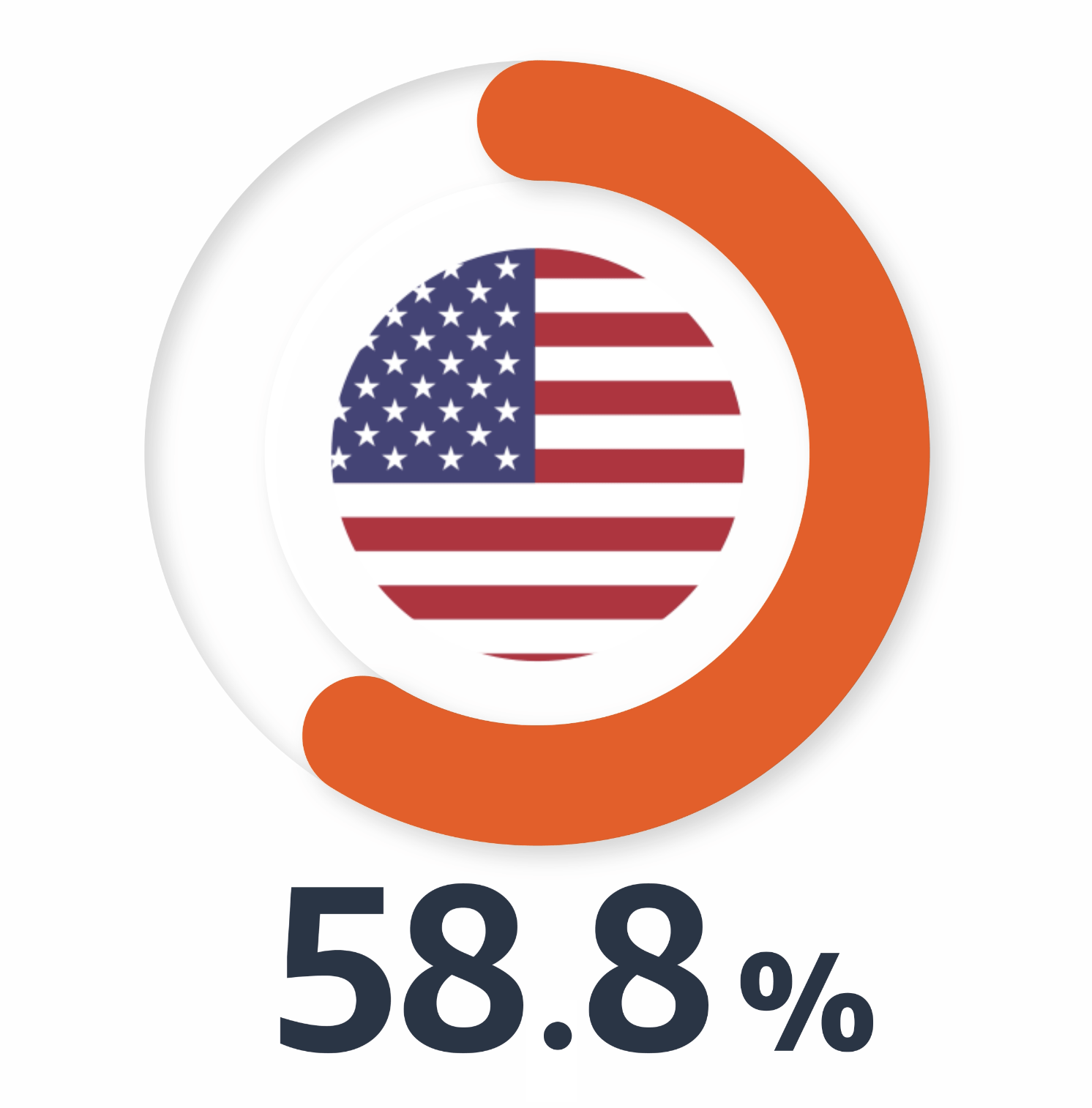
    58.8% of shoppers surveyed in the US are likely to make a purchase from an ad they see on Amazon during Black Friday/Cyber Monday.1

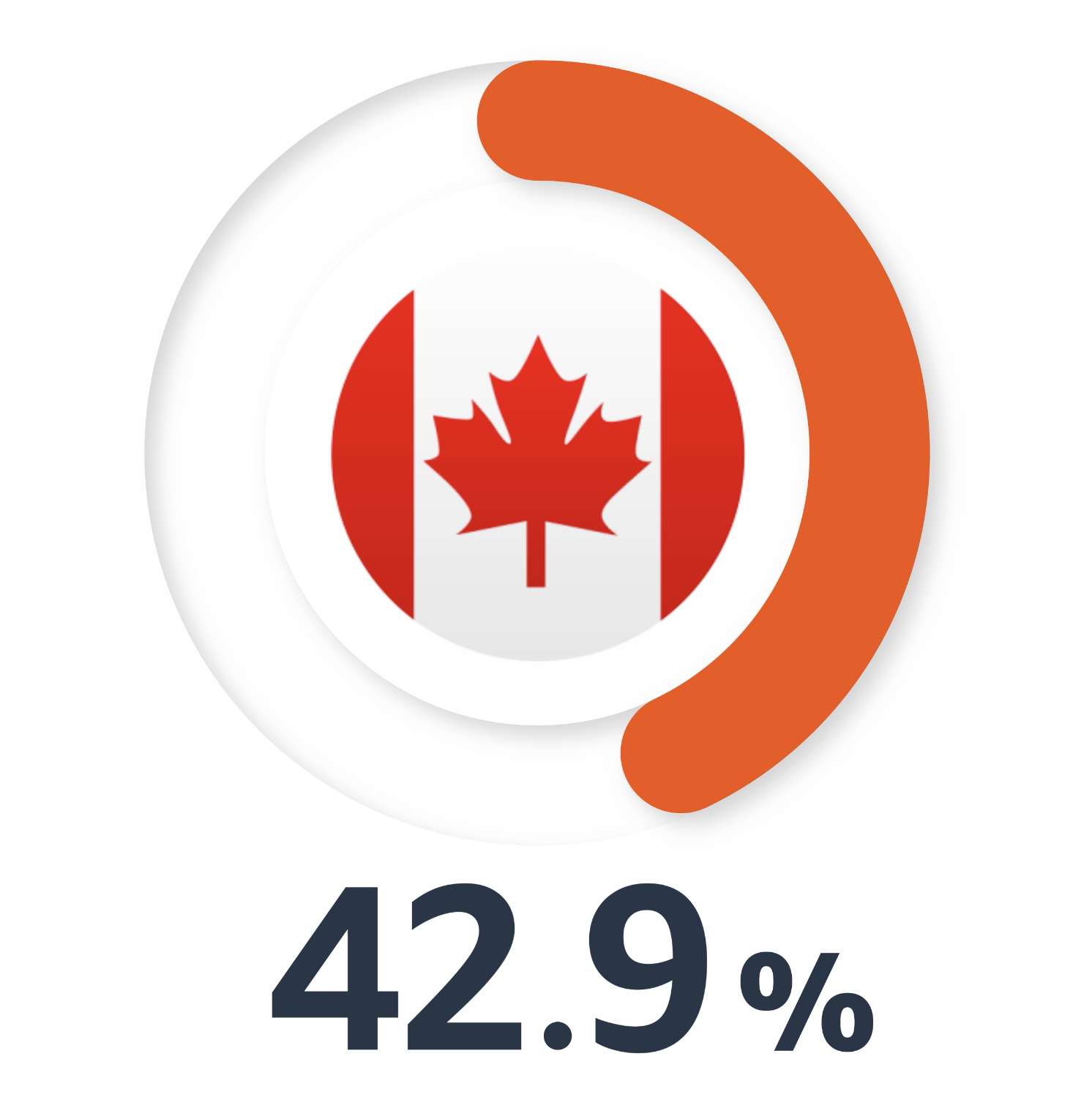
    42.9%  of shoppers surveyed in Canada are likely to make a purchase from an ad they see on Amazon during Black Friday/Cyber Monday.2

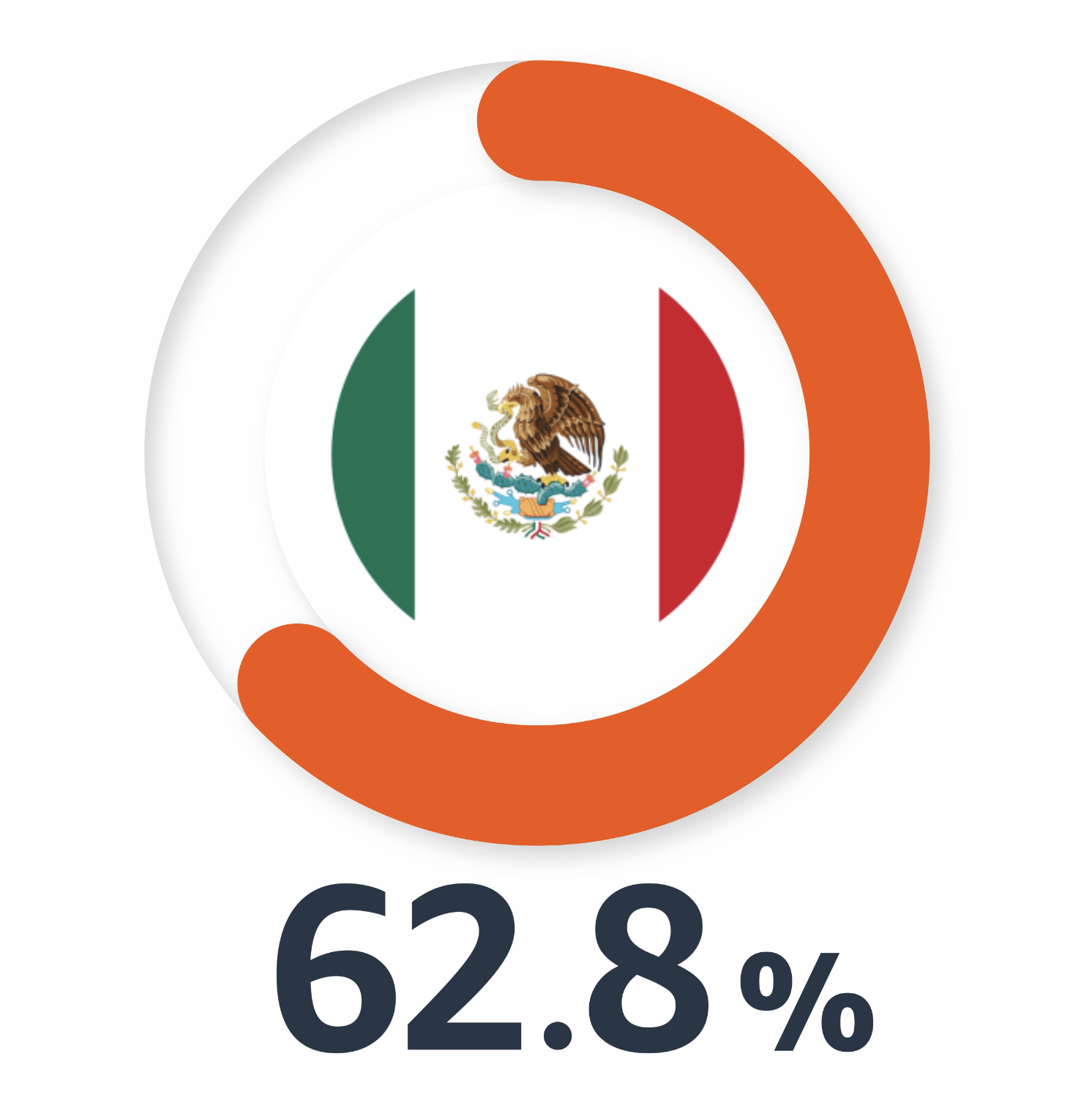
    62.8% of shoppers surveyed in Mexico are likely to make a purchase from an ad they see on Amazon during El Buen Fin and Black Friday/Cyber Monday.3

    80.8% of shoppers surveyed in Brazil are likely to make a purchase from an ad they see on Amazon during Black Friday/Cyber Monday.4

    Expanding globally

    Don’t limit yourself to advertising only in your domestic marketplace, scale your business worldwide by advertising in multiple marketplaces. Advertising globally will help you increase and diversify your potential revenue streams by offering new products to untapped markets. Build your global presence and get your brand in front of international Amazon customers by advertising in all your eligible countries.

    Note: South Africa is launching to domestic sellers and vendors only.

    Currently available marketplaces to sell and advertise

    The last day of the holiday shopping season is not the end, it’s the beginning of your next best strategies. Whether you exceeded your goals or fell short, the post-event window is a chance to analyse, optimise and activate.

    Let’s walk through the following hypothetical scenarios. These examples reflect common holiday outcomes across key product categories. For each one, assess the situation, choose the right performance summary and determine the best follow-up strategy. This exercise helps sharpen your ability to interpret results and take meaningful action.

    This guide includes content from the Ads Strategy Guidebook for holiday marketing 2025. View the entire guidebook here.

    Turn seasonal buyers into repeat customers

    Scenario 1: Skincare brand

    Top products: Holiday gift set collection, daily moisturisers, vitamin C serum.

    Holiday performance summary:

    • Gift sets sold out by mid-day Cyber Monday.
    • Sponsored Brands campaigns drove 2.1% click-through rate (CTR), above 1.8% benchmark, but conversion on skincare category keywords was under 3% (below expectation).
    • Sponsored Display campaigns drove a 70% new-to-brand (NTB) customers for the gift set.
    • Evergreen moisturisers saw a 25% year-over-year decline in sales, despite being included in deal pricing.

    Question 1: What best summarises this performance?

    Click the answer you believe is correct

    Learning and ideas for next steps:

    You reached customers with a one-time gift purchase. The next step is to encourage repeat purchases by introducing shoppers to your daily skincare line, like moisturisers and serums, which offer long-term value and recurring purchase potential.

    Question 2: What should the advertiser do next?

    Click the answer you believe is correct

    Expert advice: The time after the event is an opportunity to engage shoppers who browsed but didn’t make a purchase.

    “Engage warm leads in the week after the event is over with action-driven messaging like ‘Still in stock’ or ‘Bundle deal still live.’ Use Sponsored Display views remarketing to reengage event browsers and filter by traffic window to help reach high-intent shoppers.“

    Florian Nottorf, Adference

    How to optimise bidding rules

    Scenario 2: Wireless audio brand


    Top products: $25 wireless earbuds, Bluetooth audio accessories.

    Holiday performance summary:

    Question 1: What best summarises this performance?

    Click the answer you believe is correct

    Learning and ideas for next steps:

    High bids on broad keywords may have hurt performance. To improve ROAS, shift budget to high-intent keywords, adjust bids for top-of-shopping results placements, test bidding strategies and use negative keywords to help maintain efficiency.

    Question 2: What should the advertiser do next?

    Click the answer you believe is correct

    Expert advice: Boost efficiency with strategic top-of-shopping-results placement.

    “Refresh Sponsored Brands headlines to highlight your promotions (for example, ‘Save on XYZ’). Manually bid on high-ranking and priority shopping queries to continue to reach relevant audiences after the event.”

    Laura Meyer, Envision Horizons