This unit auto-expands to 988x320, revealing an 8 second video. It can then be expanded to reveal a full trailer.
Privacy statement
Do not enter any sensitive or personal data into the search field (e.g. name, address, financial information).
Templated Auto & User Expanding Rectangle
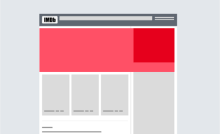
- Video displays upon expansion and resolve back to 300x250.
- Visible close button is already baked into the template, no need to include. As well as a replay button if there is an auto expand. That replay button allows the user to play the auto expand video again.
- The template below illustrates where the close button will be, it cannot be moved.
- The auto-expanded video is not clickable.
- The resolve 300x250 and the 420x320 static side panel can only have a singular button. They can differ in clickthrough URL and messaging.
- Each creative item in the unit can be date checked no more than 5 times except for the slate image.
- The trailer in the expanded state cannot exceed 5 minutes.
Product Demo (click to Play Video)
Production Specifications
| Serving | 1st party only |
| Ad Type | Custom Template |
| Supported Devices | Desktop only |
| Supported Date Messaging | Up to 5 unique date messages |
Asset Deliverables
Each ad execution has unique requirements necessary to produce the individual unit. Failure to provide assets in compliance with the guidelines and technical specifications will impact launch dates.
Client Design Asset deliverables
Date Checked Wraps:
- jpg
- 170kb
- 1608x850px
Date Checked Companion
- jpg
- 100kb
- 300x250px
Date Checked Intro Video:
- mp4
- 8 seconds
- Under 3MB
- 988x320px
Date Checked User Expand Video:
- mp4
- Less than 4 minutes
- Under 50MB
- 16:9 Aspect ratio
Slate Image for User Expand Video:
- jpg
- 50kb
- 568x320px
Date Checked Static Side Panel for User Expand:
- jpg
- 100kb
- 420x320px
Fallback Companion Image for iPad users (this must include the same CTA that the wrap is using and cannot be date checked):
- jpg
- 100kb
- 300x250px
Production Timeline
IMDb Ad Production Timelines account for the number of business days it will take to produce an ad unit. Ad Production Timelines include all typical phases of an ad lifecycle such as booking, design, trafficking and testing. Timelines vary depending on who is responsible for designing the ad unit.
- All timelines begin when design assets are received and approved by IMDb.
- All timelines end when the ad unit is live on IMDb properties.
| Client Built Timeline | 5 business days |